

Client visibility
Can clients see what they owe?
Clients can access open invoices from the Axis Client Portal, giving them a central place to see what is outstanding and take the next step.
Axis ePayments
Let clients pay invoices online, then see what was paid, which invoices it applies to, and what balance remains.
We’ll follow up by email. No pressure. No obligation. Choose a time next.
In the demo, we map your current workflow, billing, client, and reporting process before recommending a setup.
No pressure. No obligation. Migration and setup questions answered.
When payment collection happens outside the systems your firm uses for billing and client work, staff can end up chasing outstanding invoices, checking separate payment systems, and manually matching payments to accounts receivable.
Clients need clarity
They should not have to contact your firm just to determine what they owe.
Staff need connection
Payment activity should stay tied to invoices and accounts receivable.
Firms need fit
TPS syncs with supported third-party payment processors instead of acting as one.
Disconnected payment link
The client pays, but your team still has to reconcile what happened.
Payment confirmation, invoice status, and AR balance can live in separate places, creating follow-up work after the money arrives.
Axis-connected ePayments
The firm sees payment activity where billing and client work already live.
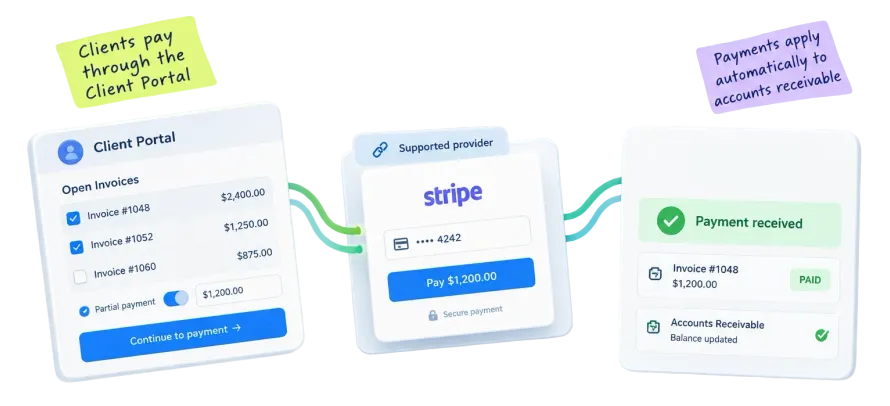
Clients view open invoices and pay through the Client Portal. Axis applies payments to outstanding accounts receivable and updates invoice payment status.
The value of electronic payments is not simply giving clients another way to pay. It is keeping the payment connected to the billing workflow that surrounds it.
The payment workflow starts from the billing activity already in Axis.
The client accesses the Axis Client Portal to review what is outstanding.
They can choose a single invoice, multiple invoices, or a partial payment amount.
Payment is made through the supported third-party payment provider.
Axis applies the payment to outstanding accounts receivable.
The invoice payment status is updated so the firm has current payment visibility.
Client visibility
Clients can access open invoices from the Axis Client Portal, giving them a central place to see what is outstanding and take the next step.
Payment choice
A client with several outstanding invoices can make payments against multiple invoices through the portal rather than handling each invoice separately.
Partial payments
Clients can make partial payments through the Client Portal, keeping the payment connected to the invoice and accounts receivable workflow.
Accounts receivable
Once a payment is made through a supported payment provider, Axis automatically applies the payment to accounts receivable and reflects the updated invoice payment status.
Axis synchronizes with supported third-party payment providers so accounting firms can connect electronic payments to billing and accounts receivable without TPS acting as the payment processor.
Explore all Axis integrations




Axis Client Portal
Syncs With
Supported payment provider
For an accounting firm, the work around a payment matters too: identifying what is outstanding, giving the client a way to act, determining which invoices the payment belongs to, and keeping accounts receivable current.
Payment received
TPS applies the payment to the outstanding balance instead of leaving staff to manually match it later.
Status updated
The invoice payment status reflects the connected payment activity after the provider processes it.
Workflow connected
Payment collection remains tied to the Client Portal, billing, and accounts receivable activity around it.
The point is not just accepting a payment. It is knowing which invoice changed, which client record it belongs to, and what your team should collect next.
No. Axis is not the payment processor. It synchronizes with supported third-party payment providers and connects the payment workflow to invoices and accounts receivable in Axis.
Axis supports payment integrations with Stripe, PayPal, CPACharge, Clover Connect, and PayClix. These third-party providers handle payment processing while Axis connects payment activity to the firm's billing and accounts receivable workflow.
Yes. Clients can view multiple open invoices through the Axis Client Portal and make payments against them.
Yes. Axis allows clients to make partial payments through the Client Portal in addition to making payments against one or multiple invoices.
Yes. Payments made through the connected ePayments workflow are automatically applied to outstanding accounts receivable, and the invoice payment status is updated accordingly.
No. Knowledge-based authentication (KBA) is a separate Client Portal capability and is not required for Axis ePayments.
Online payments work best when invoices, AR, client records, reporting, and integrations stay close together.
Ready to review collections?
Bring your current invoice, payment, AR, and client portal process. We will confirm supported processors, map how clients pay, and show how payment activity can post back to firm records.
We’ll follow up by email. No pressure. No obligation. Choose a time next.
No pressure. No obligation. Migration and setup questions answered.